

Configuration State Management
 APIpie by Neuronic AI introduces the first-of-its-kind State Management system for AI applications — an innovation you won’t find anywhere else. Built directly into our platform, this feature empowers developers, enterprises, and even open-source projects to take full control of AI behavior at runtime, without rewriting a single line of code.
With APIpie State Management, every configuration — from model selection and memory settings to integrity controls, search integration, and even the system prompt — can be centrally managed, persisted, and enforced. Whether you’re sending queries through our OpenAI-compliant API, shaping behavior in real time with our Inline CLI, or governing application defaults through a visual dashboard, state becomes the backbone of flexible and scalable AI deployment.
The value is enormous:
- For developers, it’s a flexible configuration abstraction layer. Just like Kubernetes abstracted infrastructure, APIpie abstracts AI configuration. Your apps and SDKs no longer need to bake in rigid settings or defaults. Instead, state persists across requests, overriding whatever the app enforces — giving you a powerful layer to manage models, memory, integrity, and search behavior without constant rewrites.
- For enterprises, it provides a single point of governance across teams and applications. Policies can be updated globally, costs optimized, and compliance enforced — all in real time. And when needed, state changes can be locked down so they’re only honored through the GUI, ensuring strict oversight while still enabling rapid adaptation.
- For AI enthusiasts, it’s the ultimate power-up. Take any open-source AI app — even one hard-coded to use GPT — and instantly make it run with Claude, Gemini, or any other model. Add memory where none existed, change behavior on the fly, and unlock capabilities the original developers never built in. State Management gives you control over tools you already love, without touching a single line of code.
- For innovators, it’s a launchpad. By moving configuration outside of applications, APIpie opens the door to entirely new workflows, integrations, and value-adds. Features can be layered, swapped, or extended without changing code — creating possibilities we’ve only begun to explore.
This is not just convenience — it’s competitive advantage. With APIpie, businesses and builders can adapt faster, experiment freely, and push AI-driven products to market with confidence. Our State Management framework is the first of many industry firsts we’re bringing to the table, giving you an edge over competitors and empowering you to harness AI more effectively than ever before.
three powerful ways to manage state across applications, API keys, and users. Whether you need real-time control inside a prompt, programmatic management via API, or a visual interface, our platform ensures full flexibility.
- GUI – Manage app or API key state visually via the APIpie dashboard
- API – Use the
/v1/stateendpoint to programmatically create, update, or delete state for apps and or users. - Inline CLI – Manage state directly in your prompts with natural commands like
:setmodel:.
GUI State Management
The APIpie State Management GUI provides a visual interface for configuring and controlling state across apps and API keys. It’s designed for enterprises, teams, and developers who prefer a centralized, intuitive way to enforce AI settings without relying solely on API calls or inline CLI commands.
Each tab in the GUI corresponds to a configuration area — from general flags and model selection to fine-grained controls, memory management, and internet search behavior. On the right-hand side of the GUI, you’ll always see the Current Settings JSON, which shows the effective configuration that will override any incoming API call settings for this app or user scope.
API keys can be managed through the API-key interface
Click on "Manage" next to the API key you want to manage
General Settings
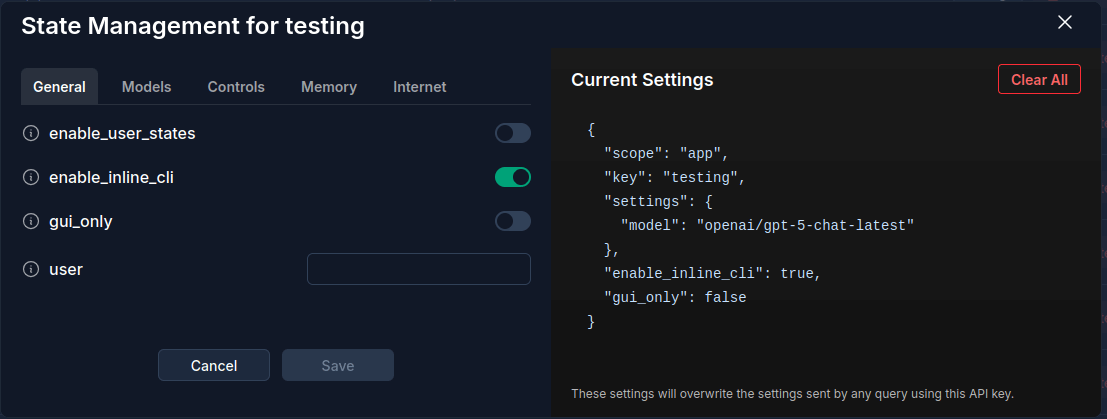
The General tab provides high-level switches that control scope, governance, and CLI access.
- enable_user_states – Enables per-user scoped state. When
true, every uniqueuservalue passed with this API key has its own isolated state. Whenfalse, the API key operates in app-scoped mode. - enable_inline_cli – Allows users to adjust state dynamically inside prompts with Inline CLI. Disable this to lock down state so prompts can’t alter configuration.
- gui_only – Locks configuration changes to the GUI only. When enabled, state cannot be modified via API or Inline CLI. Ideal for enterprises enforcing strict governance.
- user – Used to force all completions through a specific
uservalue when calling APIs with this key (not compatible with user-scoped management).
Models
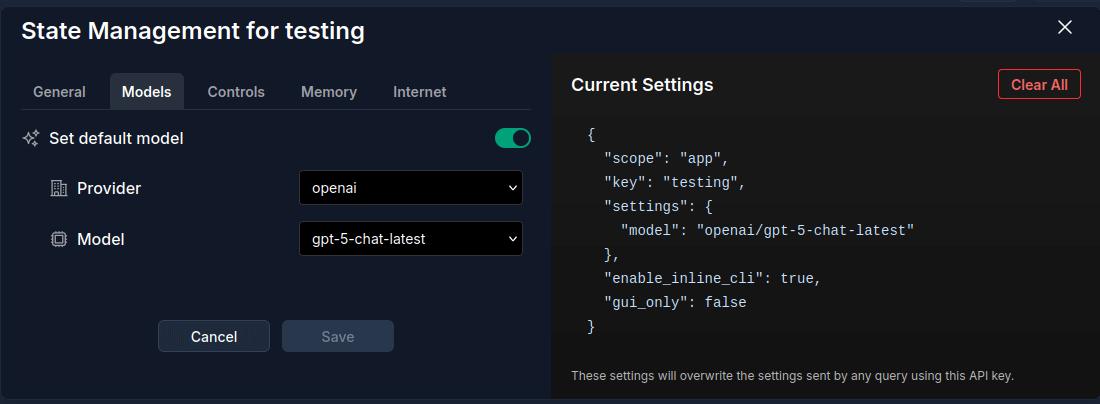
The Models tab allows you to define which AI model to use as the default for this state.
- Provider – Choose from supported AI providers (e.g., OpenAI, Anthropic, Google).
- Model – Select a specific model from the chosen provider. For example:
openai/gpt-5-chat-latest. - Set default model – When enabled, forces all completions under this key or user to use the chosen model unless overridden by Inline CLI (if allowed).
Controls
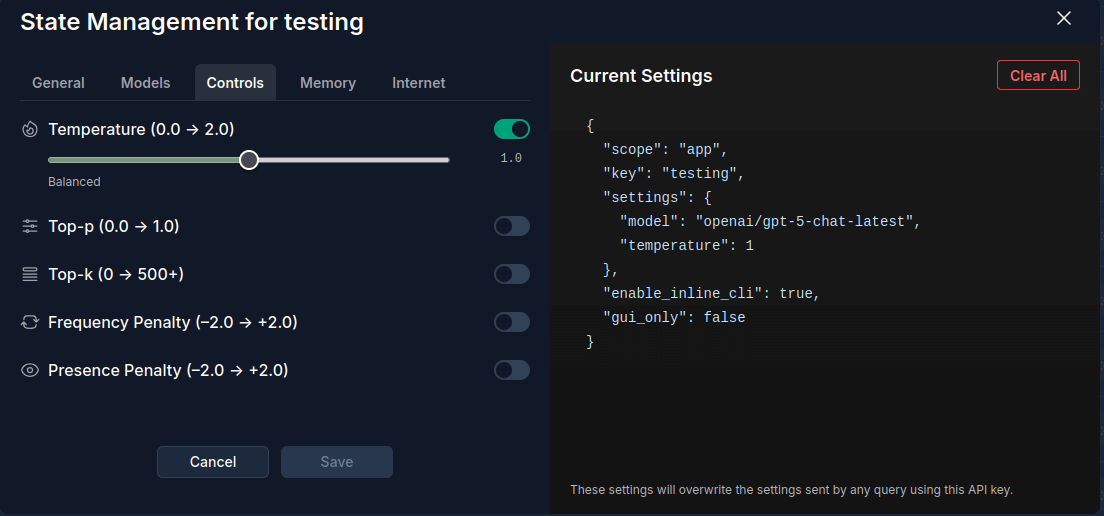
The Controls tab lets you fine-tune model generation parameters for creativity, coherence, and randomness.
- Temperature (0.0 → 2.0) – Controls randomness. Lower = more deterministic, higher = more creative.
- Top-p (0.0 → 1.0) – Nucleus sampling cutoff. Keeps responses focused while balancing diversity.
- Top-k (0 → 500+) – Restricts token selection to the top-k most probable. Useful for reducing noise.
- Frequency Penalty (-2.0 → +2.0) – Reduces repetition of frequently used tokens.
- Presence Penalty (-2.0 → +2.0) – Discourages tokens already present in the conversation to encourage novelty.
Memory
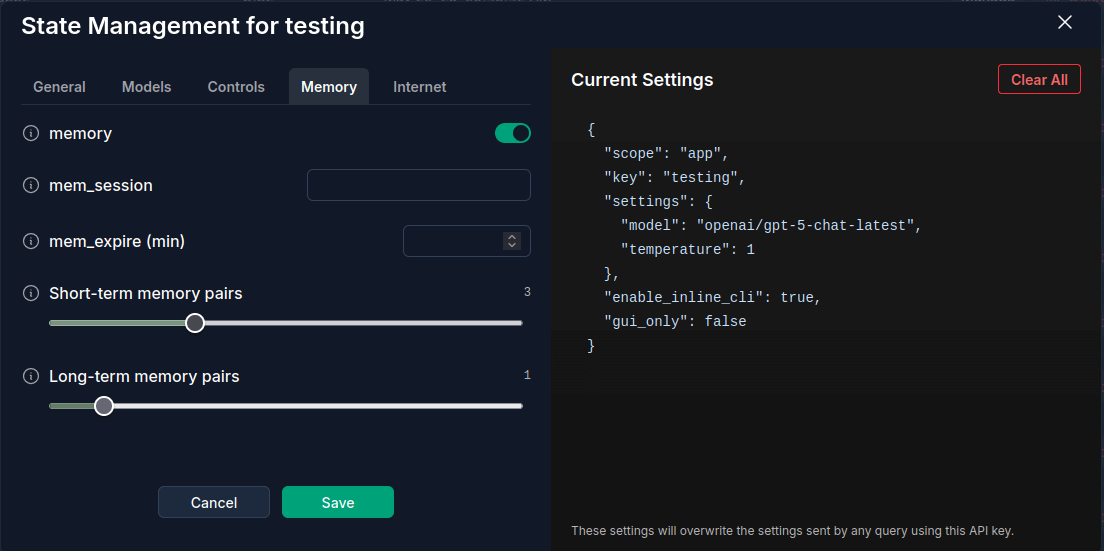
The Memory tab manages both short-term and long-term AI memory.
- memory – Global toggle for enabling memory in this state.
- mem_session – Optional custom identifier for separate memory chains (e.g.,
customer-123-sessionA). - mem_expire (min) – Sets expiration in minutes for stored memory (time-based).
- Short-term memory pairs – Number of recent message pairs (Q&A) retained in memory (max 10).
- Long-term memory pairs – Number of older message entries recalled from long-term memory (max 10).
This enables features like personalized conversations, tenant-specific persistence, or multi-session separation.
Internet
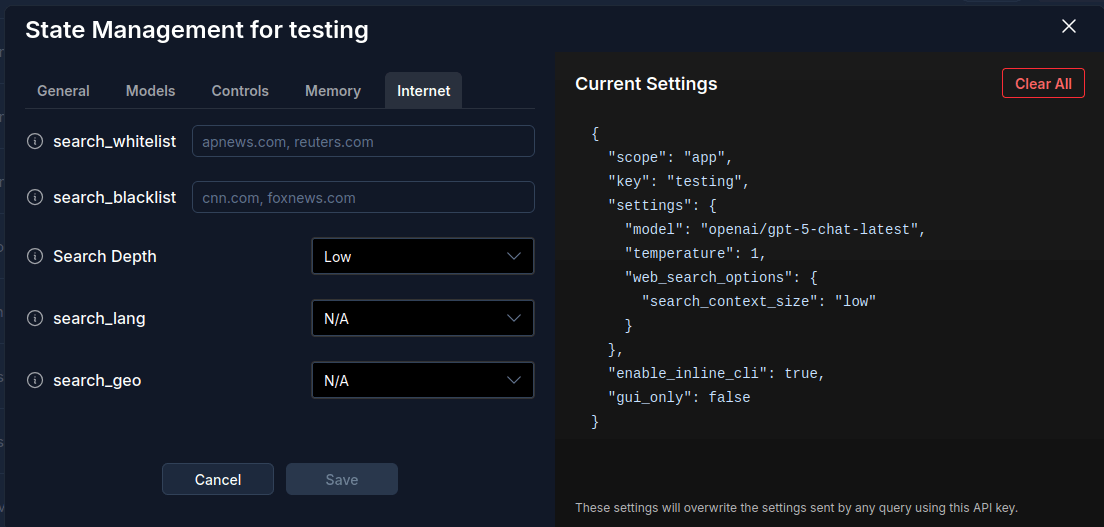
The Internet tab configures web search augmentation and content filters.
- search_whitelist – Comma-delimited list of domains explicitly allowed for AI search (e.g.,
apnews.com, reuters.com). - search_blacklist – Comma-delimited list of domains blocked from AI search (e.g.,
cnn.com, foxnews.com). - Search Depth (low, medium, high) – Determines how much web content/context is pulled into completions.
- search_lang – Restrict search results to a specific language (ISO-2 code).
- search_geo – Restrict search results by geographic region (ISO-2 country code).
These settings allow enterprises to enforce compliance, control bias in sources, and optimize retrieval quality.
Together, these GUI tabs give teams complete control over every aspect of AI behavior, while the Current Settings JSON ensures transparency by showing exactly what configuration is active. Whether you want flexibility for developers or governance for enterprises, the GUI provides a straightforward and powerful state management experience.
API State Management
Developers can manage application or user state programmatically via the /v1/state endpoint. This provides fine-grained control over configuration, memory, and routing at both per-app and per-user levels.
State Management API REFERENCE
Authentication
Authenticate using either:
- Authorization header with a Bearer token
- x-api-key header
Authorization: Bearer <YOUR_API_KEY>
x-api-key: <YOUR_API_KEY>
Endpoints
GET /v1/state
Retrieve the current state settings.
- Without query params → returns app-level state.
- With
?user={userId}→ returns user-specific state. - With
?app_name={name}→ supports centralized enterprise state management.
curl -X GET "https://apipie.ai/v1/state" \
-H "Authorization: Bearer <API_KEY>" \
-H "Content-Type: application/json"
POST /v1/state
Create or update state. Supports partial updates, key deletions, and toggling features.
curl -X POST "https://apipie.ai/v1/state" \
-H "Authorization: Bearer <API_KEY>" \
-H "Content-Type: application/json" \
-d '{
  "settings": {
    "memory": false,
    "model": "openai/gpt-4-1",
    "search_lang": "en",
    "search_geo": "us",
    "shortMem": 10,
    "routing": "price"
  }
}'
DELETE /v1/state
Delete entire state records.
- With
?user={userId}→ deletes state for a user. - Without query → deletes app-level state.
curl -X DELETE "https://apipie.ai/v1/state" \
-H "Authorization: Bearer <API_KEY>" \
-H "Content-Type: application/json"
Example API Workflows
Disable Inline CLI
curl -X POST "https://apipie.ai/v1/state" \
-H "Authorization: Bearer <API_KEY>" \
-H "Content-Type: application/json" \
-d '{
  "enable_inline_cli": false,
  "settings": {}
}'
Add & Delete State Keys in One Request
curl -X POST "https://apipie.ai/v1/state" \
-H "Authorization: Bearer <API_KEY>" \
-H "Content-Type: application/json" \
-d '{
  "settings": { "nlp": false },
  "delete": ["routing"]
}'
Enable User Scoped States
curl -X POST "https://apipie.ai/v1/state" \
-H "Authorization: Bearer <API_KEY>" \
-H "Content-Type: application/json" \
-d '{"enable_user_states": true }'
Example Response
All state responses return a consistent schema including scope, key, settings, and feature flags:
{
  "scope": "app",
  "key": "stateTest",
  "settings": {
    "memory": false,
    "mem_session": "testState",
    "model": "openai/gpt-4-1",
    "search_lang": "en",
    "search_geo": "us",
    "shortMem": 10,
    "longMem": 2,
    "routing": "price"
  },
  "enable_inline_cli": true,
  "gui_only": false
}
Inline CLI State Management
The Inline CLI provides real-time state control inside your prompt flow. This feature lets you configure and persist AI state with natural commands in the first or last 250 characters of any prompt.
Quick Start
Send :help in your prompt with your APIpie key in your favorite chat app to see all supported commands. This is the fastest way to explore available options.
Example Usage
The following example shows how to persistently set a model and then confirm the saved state with :getstate:
curl -X POST 'https://apipie.ai/v1/chat/completions' \
-H 'Authorization: Bearer <API_KEY>' \
-H 'Content-Type: application/json' \
--data-raw '{
  "user": "12345",
  "inline_cli": "all",
  "messages": [
    { "role": "user", "content": ":setmodel:openai/gpt-4o :getstate" }
  ]
}'
This sets the model to OpenAI GPT-4o for all subsequent requests (until unset) and immediately returns all current state configuration for this user or app depending on if its scoped for app or user. Youc an do a lot more than jsut state management with our inline CLI, for example:
Inline CLI supports commands for:
- Viewing state (
:getstate) - Model selection (
:setmodel:openai/gpt-4o,:unsetmodel) - Behavior shaping (
:becreative,:beprecise) - Integrity controls (
:setintegrity,:answersuperintegrity) - Memory control (
:setmemoryon,:clearmemory) - Search integration (
:search,:deepsearch)
Learn more in the Inline CLI guide.
Understanding State Management Controls
In addition to core configuration settings, APIpie State Management includes special control options that determine how state can be changed, who it applies to, and how it persists. These controls make state even more powerful and adaptable across different use cases.
Inline CLI Toggle
The enable_inline_cli flag determines whether users can modify state directly from inside their prompts using the Inline CLI.
- When enabled, users gain the ability to naturally adjust models, memory, integrity, and other aspects of the API call inline with their query (
:setmodel:,:becreative, etc.). - When disabled, all inline commands are ignored, and state can only be changed through the API or GUI.
This toggle allows teams to decide how much flexibility to grant to end users.
GUI-Only Mode
The gui_only flag enforces that all state changes must be made in the APIpie dashboard.
- When enabled, both API-based updates and Inline CLI commands are blocked.
- When disabled, state can be updated via any method (API, CLI, or GUI).
This is especially useful for enterprises that need strict governance and want to ensure changes are audited and centrally managed.
Scope: App vs. User
Every state configuration is tied to a scope, which can be either app or user.
- App-scoped state applies to all requests made with a given API key.
- User-scoped state applies individually to each
uservalue sent with that API key. Each user maintains their own isolated state, making this ideal for multi-tenant services where every end-user experience needs to be personalized.
Important notes about scope behavior:
- An API key (and its associated app) can only support one scope: either app-scoped or user-scoped, not both.
- Switching a state from
apptouser(or vice versa) will clear all existing configurations. - The
keyfield in a state record reflects theapp_nameor API key name defined when the key was created.
These special controls — Inline CLI, GUI-only mode, and scoping — ensure that state management works not only as a configuration system but also as a flexible governance layer. Together, they give individuals freedom when needed and enterprises the ability to enforce structure when required.
Conclusion
APIpie by Neuronic AI delivers turnkey AI infrastructure for developers and enterprises. With Inline CLI for real-time prompt control, API for programmatic configuration, and GUI for enterprise governance, you can manage state seamlessly across apps, API keys, and users.
Start with Inline CLI (:help) or explore /v1/state for advanced control.
AI Voice: ElevenLabs & OpenAI TTS API Guide
Generate lifelike voices with our advanced text-to-speech API, featuring 30+ voices, multilingual support, and customizable options.
Minimize AI Hallucinations with Integrity
Enhance AI accuracy with our Integrity feature, reducing errors and ensuring reliable results for critical business applications. Explore its benefits today!