

Cursor's 'Does Not Work with Your Current Plan or API Key' Fix


Fix Cursor's "Model XXX Does Not Work with Your Current Plan or API Key" Error
If you're reading this, you've likely encountered the frustrating "Model XXX Does not work with your current plan or API key" error in Cursor IDE. This limitation has affected thousands of developers since Cursor restricted free account access to premium AI models. The good news? We nativley provide a unique workaround that lets you access Claude 3.5 Sonnet, GPT-4o, Gemini Pro, and other premium models even with a free Cursor account.
⚠️ Understanding the Problem
Cursor IDE's recent policy changes have created significant barriers for developers:
- Free accounts are restricted to GPT-4.1 and "Auto" models only
- Custom API keys don't bypass the restriction - even if you have your own OpenAI API key
- Premium models like Claude 3.5 Sonnet, Kimi-K2-Instruct, and Gemini Pro require a Cursor Pro subscription even if you are using your own API key and custom endpoint like APIpie.
The Frustrating Reality
Even developers who configured their own API keys and custom endpoints found themselves locked out. Cursor's backend validates your account tier before allowing access to premium models, making custom endpoints and BYO API keys pointless in most cases except with APIpie.ai
This is particularly frustrating for developers who want to use their own API credits but are blocked by Cursor's artificial restrictions.
🚀 The APIpie Solution: A Game-Changing Workaround
We've discovered a unique solution that leverages APIpie's API key state management feature to completely bypass Cursor's model restrictions. This approach works because we can pre-configure which model your API key should use, regardless of what Cursor requests.
How It Works
- API Key State Override: APIpie allows you to set a "state" on your API keys that overrides any model parameter sent in requests
- Cursor Compatibility: You tell Cursor to use an allowed model (like GPT-4.1) while actually receiving responses from premium models
- Transparent Operation: Cursor displays GPT-4.1 but your queries are processed by Claude 3.5 Sonnet, Kimi-K2-Instruct, or any model you choose
📋 Step-by-Step Implementation Guide
Step 1: Setup your APIpie account and Cursor's initial settings.
- Follow our Integration Guide: Visit Cursor Integration Guide
- Confirm Free Account Accessibility: After disabling all of the models except the one usable "Free Tier" model (currently gpt-4.1) verify the settings work by asking Cursor a simple quetion.
- Confirm Queires reach APIpie.ai: After testing you will see query history in the APIpie Observability Dashboard with the basic free model.
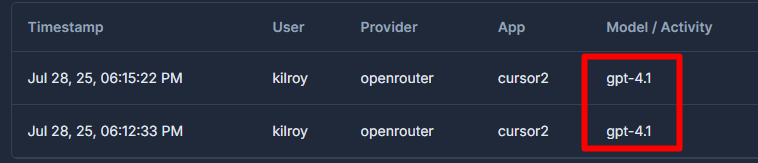
Step 2: Configure API Key State (The Secret Sauce)
This is the crucial step that makes the workaround possible:
- Find your desired model: Visit the APIpie.ai Dashboard and find your desired model and note down model name and or provider.
- Open Chat Interface: Start a new conversation in Cursor
- Set to Ask Mode: Ensure the chat mode is set to "ask"
- Use Inline CLI: Send this command as your first message:
:setmodel:deepinfra/Kimi-K2-Instruct
Replace deepinfra/Kimi-K2-Instruct with your preferred provider/model ie.
anthropic/claude-3-5-sonnet-20241022openai/gpt-4oopenrouter/gemini-2-5-prodeepseek/deepseek-v3
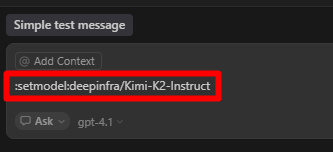
- Stop Pointless Cursor Messages: After you submit the initial "set model" command Cursor may generate pointless messages feel free to stop the chat as the model will already have been changed.
- Configuration Lock: When state is set, APIpie ignores any model parameters from requests and uses your pre-configured choice, any further queries on this API key will use the set model until you clear it or change it.
Step 5: Verify It's Working
- Check Display: Cursor will continue showing GPT-4.1
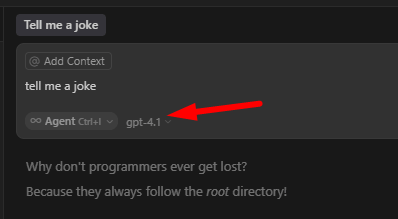
- Monitor Usage: Visit your APIpie Observability Dashboard to see the actual model being used
- Test Capabilities: Open up new chats and use Cursor as you want with any model available on APIpie.
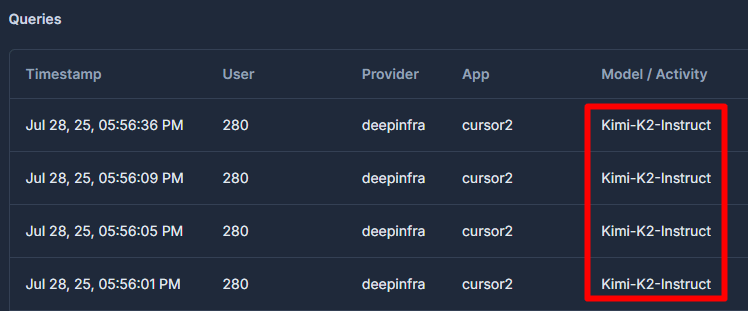
💡 Why This Works When Other Methods Fail
Traditional Workarounds (Don't Work)
- ❌ Direct API Keys: Cursor proxies direct API via its back end for prompt processing and validates the account tier / Model before processing
- ❌ Proxy Services: Most don't offer stateful API keys requiring Models to be sent from Cursor.
APIpie's Unique Advantage
- ✅ State Management: Pre-configures model selection at the API key level
- ✅ Transparent Operation: Cursor sees allowed models while you get premium features
- ✅ Cost Control: Pay only for what you use
🔧 Advanced Tips
Model Switching
You can switch models anytime during your conversation:
:setmodel:anthropic/claude-3-5-sonnet-20241022
Clearing Model State
To return to the default model or clear the state:
:clearmodel
🔍 Troubleshooting
Common Issues and Solutions
Issue: Still getting restricted model responses
Solution: Verify the :setmodel: command was successful by checking your APIpie usage dashboard
Issue: INVALID_PAYLOAD status: 400 - "Model is not provided" Solution: Double-check the model and provider name from the APIpie dashboard and ensure correct spelling in the format "provider/model"
Issue: High API costs Solution: Use cost-effective models like DeepSeek V3 for routine tasks, reserve premium models for complex work
📚 Additional Resources
- Cursor Integration Guide: Complete setup instructions
- APIpie InlineCLI Documentation: Inline CLI Commands
- Usage Monitoring: APIpie Observability Dashboard
- Support: Join our Discord community for help
🚀 Get Started Today
Ready to unlock premium AI models in Cursor? Here's your action plan:
- Set up APIpie: Follow our Cursor integration guide
- Test the workaround: Use the
:setmodel:command in a new chat - Monitor usage: Check your dashboard to confirm it's working
- Explore models: Try different models to find your favorites
With APIpie's unique API key state management, you can bypass Cursor's restrictions and access any AI model you need, all while using your own API credits and maintaining cost control.
This solution leverages APIpie's innovative inline CLI feature. Learn more about our developer-focused features and start building with unrestricted AI access today.